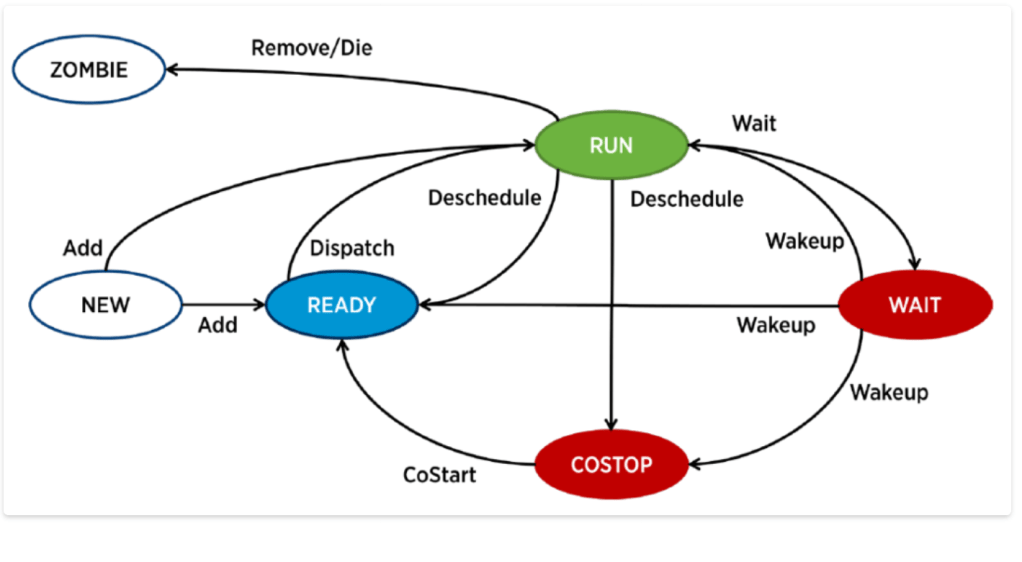
A VM CPU is on one of these 4 states: Run, Ready, Co-Stop and Wait.
- Run – Run means VM is consuming CPU cycle. In other words, VMkernel has enough physical CPU cycle to give it to VM. We can see this counter from esxtop , under %run and also from vCenter GUI.
- Ready– Ready means VM is ready but it is not getting physical CPU cycle from VMkernel.
- Co-Stop– This state is only applicable to VMs with more than 1 vcpu. If VMkernel has only some of the CPUs, then it will run the VM partially. Eventually, there will be unbalanced and it will be stopped. The Co-Stop counter is increased to account for this.
- Wait-Wait means CPU is idle. It is not doing any work. Either it is really idle or waiting for IO.
Below is the diagram from the technical whitepaper “The CPU Scheduler in VMware vSphere® 5.1
 Virtualization blog